 Timeline
How to ask ChatGPT or Claude where you’ve been
ChatGPT and Claude only know where you’ve been if you share your location history. Here’s how to upload an export, or connect it with MCP so they can look it up.

Can ChatGPT or Claude see where you've been?
Not unless you show them. Neither has any record of the places you've visited. You can upload an export of your history to a chat, or connect a source they can look things up in when you ask.
Upload your location history to a chat
This is the quickest way, and it works on ChatGPT's free plan too.
- Export your history. In Google Maps on iPhone, tap your profile picture and go to SettingsLocation & PrivacyExport Timeline data. On Android it's in the phone's Settings app, under LocationLocation servicesTimeline. How to export your Google Maps Timeline has the details.
- Start a new chat and attach the file.
- Say what it is, and ask something specific: "This is my Google Maps Timeline export. List every place I visited from 3 to 9 August, with the date and times, as a table."
Big exports can be too long for the assistant to read in full, so narrow things down. Ask about one trip or one month, and ask it to tell you when a day has no data.
For a one-off question, a temporary chat in ChatGPT or an incognito chat in Claude isn't used for training. Delete the chat and the file afterwards. In ChatGPT, files saved to your Library stay there until you delete them too.
Connect your history instead
Uploading works for a single trip, but it gets old fast. The alternative is a connector, built on a standard called MCP. Instead of reading a whole file, the assistant asks for just what each question needs: "Saturday's visits", say. New days show up on their own, and you can disconnect whenever you like.
| Claude | ChatGPT | |
|---|---|---|
| Called | Custom connector | Custom MCP server |
| Plans | All plans (one connector on Free) | Pro, Business and Enterprise |
| Where to add it | CustomizeConnectors, then + Add | Plugins, then + and Add custom MCP server |
| Works on | Web, desktop and mobile | Web only |
Checked October 2026 in Claude's and OpenAI's help centres. On team plans, an admin usually adds the connector for everyone.
How Timeline connects to ChatGPT and Claude
Timeline for iPhone records your visits on your phone and works without an account. It's coming soon to the App Store. Connecting an assistant is optional. When you turn it on, the app uploads a copy of your visits to Timeline's server, and the assistant reads that copy, read only.
The assistant sees your visits with their times and place names, your saved places like Home and Work, and the last position your phone uploaded. Raw location readings and motion data never leave the phone. It can't change or delete anything.
- In Timeline, open SettingsChatGPT, or Claude, or Other Assistant for any other MCP app.
- Sign in with Google. Nothing is shared yet.
- Choose All history or From today.
- Tap Copy to copy the server address, then Open ChatGPT or Open Claude.
- Add it as a connector in the assistant (see the table above) and paste the address.
- Sign in with the same Google account, check what the assistant will be able to read, and tap Allow.
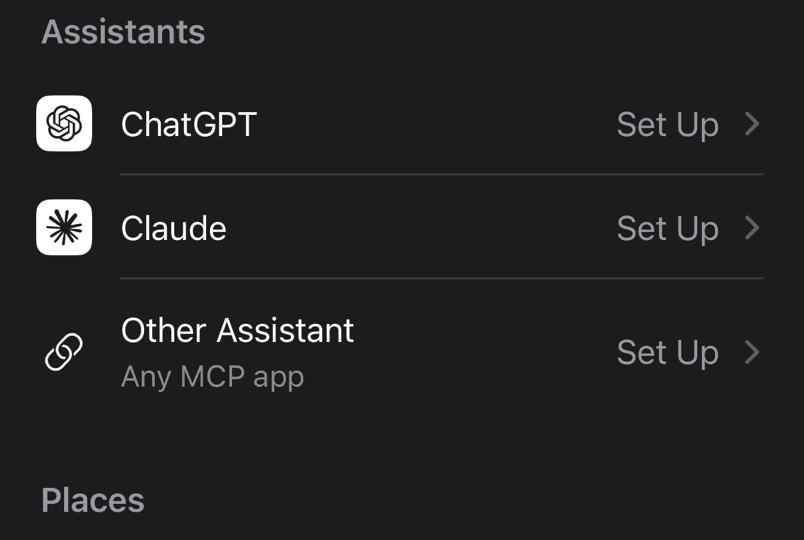
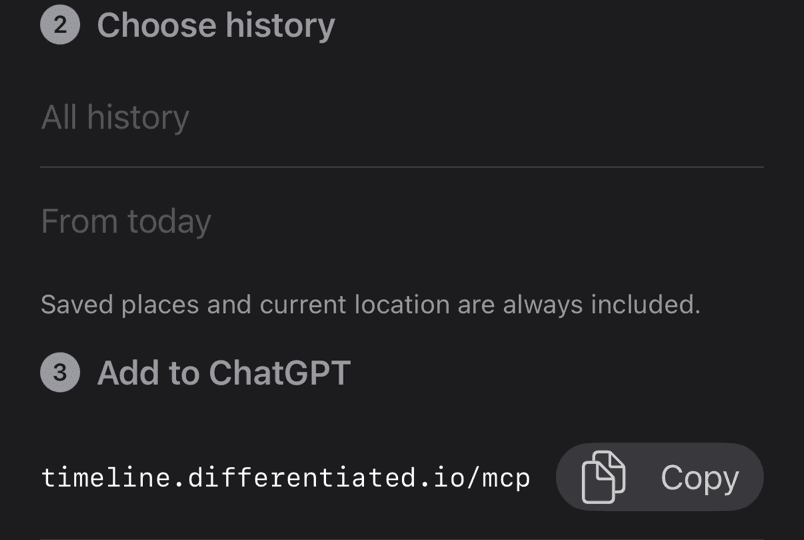
Back in Timeline, the assistant now shows as Connected · Read only.
Questions to try
- "Where was I last?"
- "What did I do on Saturday?"
- "Where did I go last week? Put it in a table."
- "When was I last at the climbing hall?"
- "How long was I at work each day last week?"
- "My friend's in Berlin next weekend. Plan her a day around my favourite spots."
It can't see the route you took or how you travelled, only the stops and the time between them. It can't follow you live either. Your phone uploads now and then, so a day you've just lived may not be there yet.
Disconnect or delete
To disconnect an assistant, open it in Timeline's Settings and tap Disconnect ChatGPT (or Disconnect Claude). You can also remove the connector in ChatGPT or Claude, or on your account page.
To pause sharing or delete the copy on the server, go to SettingsAccount in Timeline. Delete Shared History removes the server copy, and Delete Account removes everything, connections included. Your history on the iPhone isn't touched. The privacy policy has the details.
Questions
Can ChatGPT read my Google Maps Timeline?
Yes, if you upload the export. It's a JSON file, which ChatGPT can analyse. It can't reach the Timeline on your phone directly.
Is it safe to give ChatGPT or Claude my location history?
It's as safe as your settings. Turn off model training or use a temporary chat, and delete the chat afterwards. A read-only connector shares less than a full file, and you can disconnect it at any time.
Do I need a paid plan?
Not for uploading, and not for Claude, whose free plan allows one custom connector. In ChatGPT, custom connectors need Pro, Business or Enterprise.
Why does the assistant say a day is empty?
The day may not have been uploaded yet, or the phone recorded no stops. An empty day doesn't prove you stayed home, and Timeline tells the assistant so.
Sources
Checked against these pages on 18 October 2026. The Timeline steps come from the app itself, and we haven't yet connected a real ChatGPT or Claude account from start to finish.
- Connecting custom MCP servers in ChatGPT, OpenAI Help Center
- Uploading files to ChatGPT and how your data is used, OpenAI Help Center
- Get started with custom connectors and uploading files, Claude Help Center
- Changing your model improvement setting, Anthropic Privacy Center
- Manage your Google Maps Timeline, Google Maps Help