 Timeline
Google Timeline alternatives for iPhone
Keep Google Maps Timeline, use Apple’s Visited Places, or switch apps. How Arc, Dawarich, OwnTracks and others compare on import, privacy, export and cost.

The best Google Timeline alternatives on iPhone
You can stay with Google Maps Timeline, use Apple Maps' built-in Visited Places, or install an app. Arc Timeline 4 is the most detailed diary. Dawarich is the one that can bring in your old Google history. OwnTracks suits people who run their own server, and Fog of World is for travellers who like a map of everywhere they've been.
How they compare
| What it records | Where it's kept | Export | Imports Google | Price | |
|---|---|---|---|---|---|
| Google Maps Timeline | Visits and routes | Your phone, optional Google backup | JSON | Its own backups only | Free |
| Apple Maps Visited Places | Places you stopped | Your Apple devices, encrypted | None | No | Free, iOS 26, some countries |
| Arc Timeline 4 | Visits, trips and how you travelled | Your phone, optional iCloud backup | JSON, GPX | Not yet | $44.99 a year or $219.99 once |
| Timeline for iPhone | Visits and how you got between them | Your phone | Text, JSON | No | Coming soon |
| Dawarich | Location points and visits | Their cloud or your server | GPX, GeoJSON | Yes | Free to self-host. Cloud Lite €59.99 a year on its website |
| OwnTracks | Location points | Your server | JSON, CSV, GPX | No | Free |
| Fog of World | GPS tracks | Your phone, optional cloud sync | Not listed | No | $30 once |
Prices checked in October 2026, from the US App Store unless noted.
What to look for
Your old history comes first. Only Dawarich can import Google's files, so whatever you choose, keep your export somewhere safe. You may want it in another app later.
Then think about battery. Apps that keep GPS running in the background, like Fog of World and OwnTracks in its detailed mode, warn that they use a lot. Apps built on the iPhone's own low-power location signals use less. Nobody has published a fair side-by-side test, so try an app for a week and check SettingsBattery.
Last, check where your history ends up and whether you can take it with you. The table covers both.
Keep using Google Maps Timeline
Staying is fine if Google's record works for you. It's free, it records automatically once you set Google Maps' location to Always, and the history stays on your phone with an optional encrypted backup.
The weak spot is that everything now depends on one app on one phone. If you're seeing gaps, why Google Timeline misses visits covers the usual causes.
It makes most sense if you have years of Google history and use Google Maps every day anyway.
Apple Maps Visited Places
Since iOS 26, Apple Maps can keep a list of places you've stopped at, under MapsPlacesVisited Places. It's built in, encrypted, and you choose whether to keep visits for 3 months, a year or forever.
It only lists places Maps can name, like shops and restaurants, not the journeys between them, and there's no export. It's also only offered in 32 countries and regions, including the US, the UK, Canada and Australia but none in the EU. How to see your location history on iPhone walks through it.
It's the easy choice if you just want to find that restaurant again without installing anything.
Arc Timeline 4
Arc is the most complete diary here. It runs in the background, logs where you went and how long you stayed, and tells walking, cycling, driving, trains and planes apart, along with 20 or so other activities. It can add steps and heart rate from Apple Health, and your data stays on your phone with an optional iCloud backup.
It exports JSON and GPX, and imports GPX. It can't import Google Timeline yet, though its developer has said he hopes to add it. It needs iOS 26 and costs $4.99 a month, $44.99 a year or $219.99 once after a free trial.
Pick Arc if you want a detailed, editable record of every trip and don't mind paying for it.
Timeline for iPhone
Timeline for iPhone is the app this site is about, so bear that in mind. It records your visits automatically with Apple's visit detection and shows each day on a map, with your stops and how you got between them. Your history stays on your phone, with no account, and exports to plain text or JSON whenever you like.
What sets it apart is an optional, read-only connection to Claude or ChatGPT, so you can ask an assistant where you've been. Turning that on uploads a copy of your visits to Timeline's server, which you can delete at any time.
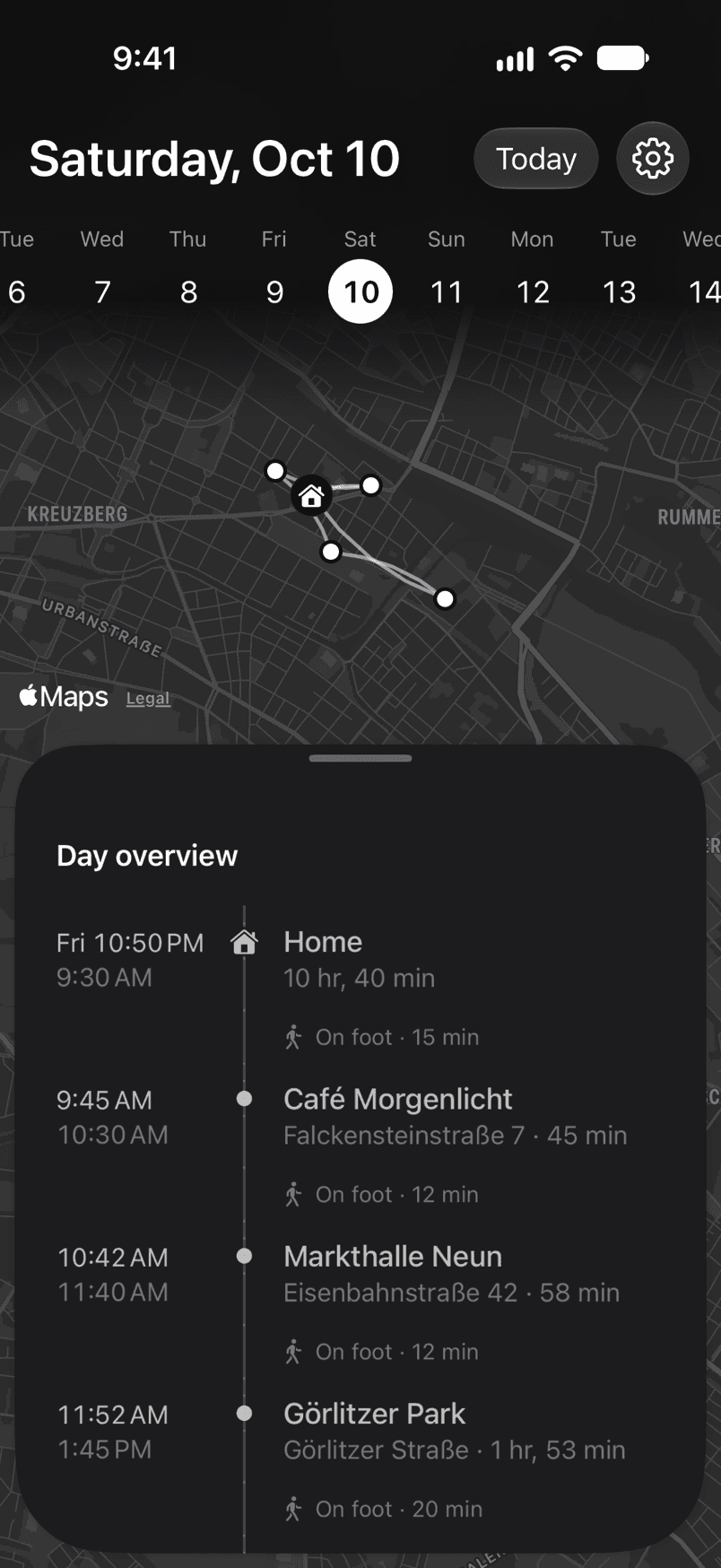
It's coming soon to the App Store, and it can't import Google's file. Arc does more if you want health data and detailed editing.
It suits you if you want a simple record of your days that you can also ask an assistant about.
Dawarich
Dawarich is open source, and it's the only option here that imports Google's files, both old Takeout downloads and the file Google Maps exports today. Your old years and your new recording end up on one map in your browser.
Its iPhone app sends your location to Dawarich Cloud, hosted in Germany, or to a server you run yourself. Self-hosting is free. On its website, Dawarich Cloud costs €59.99 a year for Lite, which keeps 12 months of history, or €119.99 a year for Pro, with no limit. The App Store sells the same plans in dollars at different prices.
Choose it if keeping your Google years together with what comes next matters most.
OwnTracks
OwnTracks is a free, open-source app that sends your location to a server you run. Its companion Recorder stores it and shows it on a map. By default it reports bigger moves only, which is easy on battery. A detailed mode tracks more closely and uses battery like a navigation app.
It gives you location points, without a diary of visits like the others here.
It's worth it if you already run a home server and want raw data that never touches a company.
Fog of World
Fog of World covers a world map in fog and clears it wherever you go, with stats by country. It records GPS tracks in the background and keeps them on your phone, no account needed. It costs $30, and it can import GPX and KML files.
Travellers love it for the picture of everywhere they've been. It won't give you a day-by-day list.
Questions
Can I import my Google Timeline into another app?
Dawarich is the only one here that can, including the file Google Maps exports on iPhone. Apple Maps, Arc and Timeline can't import it.
Is there a free Google Timeline alternative for iPhone?
Yes. Apple Maps Visited Places is free and built into iOS 26, where it's available. OwnTracks and self-hosted Dawarich are free too, but you need to run a server.
What replaced the Moves app?
Moves shut down in 2018. Arc Timeline 4 and Timeline both record your days automatically in a similar way, without you starting anything.
Which location history app uses the least battery?
There's no independent test. Apps that keep GPS on in the background use the most. Arc's developer says low-detail recorders like Google Timeline use much less.
Is Arc Timeline free?
No. It's free to download, but after the trial it needs a subscription or the one-off purchase.
Sources
Prices and features come from each app's App Store listing, website or documentation, checked on 18 October 2026. We make Timeline, one of the apps compared here.
- Manage your Google Maps Timeline, Google Maps Help
- View Visited Places in Maps and iOS feature availability, Apple
- Arc Timeline and its release notes
- Dawarich pricing and importing existing data
- OwnTracks documentation