 Timeline
Why your Google Timeline is missing visits
Google Timeline records only when the right settings are on, and it now lives on each phone. Here’s how to find the cause of a gap, and what a backup can restore.

Why is Google Timeline missing visits?
It's usually a setting. Timeline only records while Timeline and location are both on and Maps isn't in Incognito mode. On iPhone, Google Maps also needs your location set to Always.
If older history has vanished, that's a different problem, covered further down.
Check that Timeline is recording
- In Google Maps, tap your profile picture, then Your Timeline.
- Tap More, then Location and privacy settings.
- Make sure it says Timeline is on and Location is on (on iPhone, Location Services is on).
Then open your profile menu again. If you see Turn off Incognito mode, tap it, because Incognito pauses Timeline for the whole phone. While you're there, check you're signed in to the account you expect. Each account has its own Timeline.
Fix gaps on iPhone
Timeline records while Google Maps is closed, so it needs your location in the background.
- Open Settings and go to Privacy & SecurityLocation Services.
- Check that Location Services is on.
- Scroll down and tap Google Maps.
- Choose Always, and leave Precise Location on.
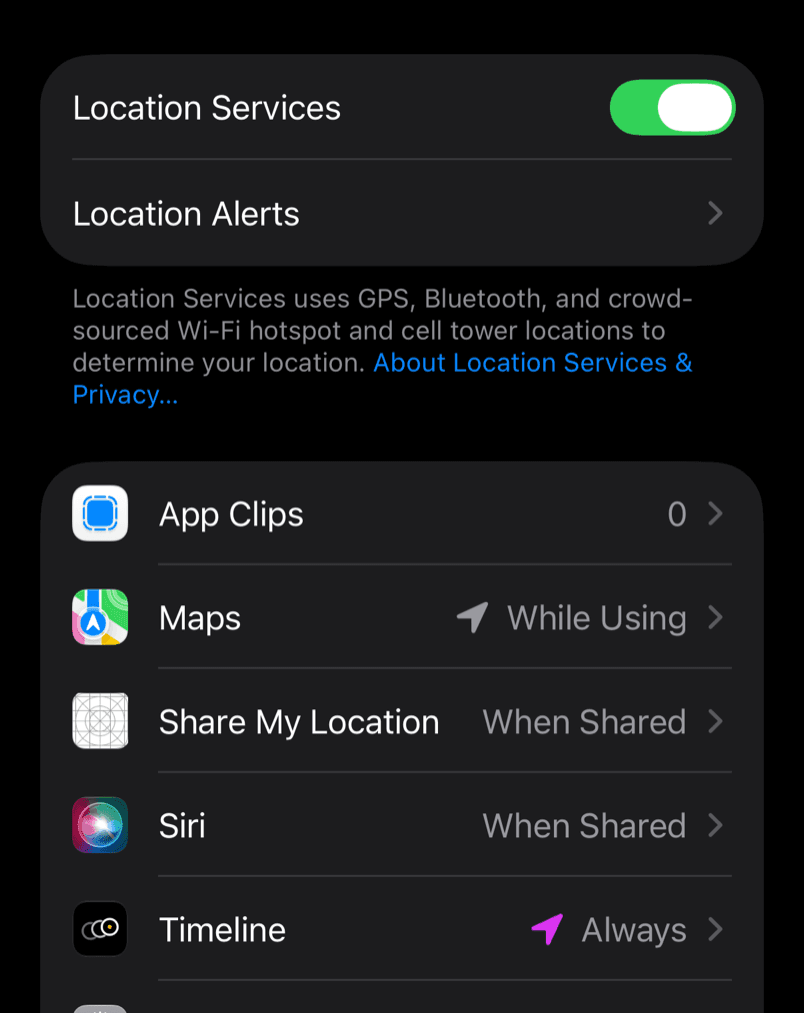
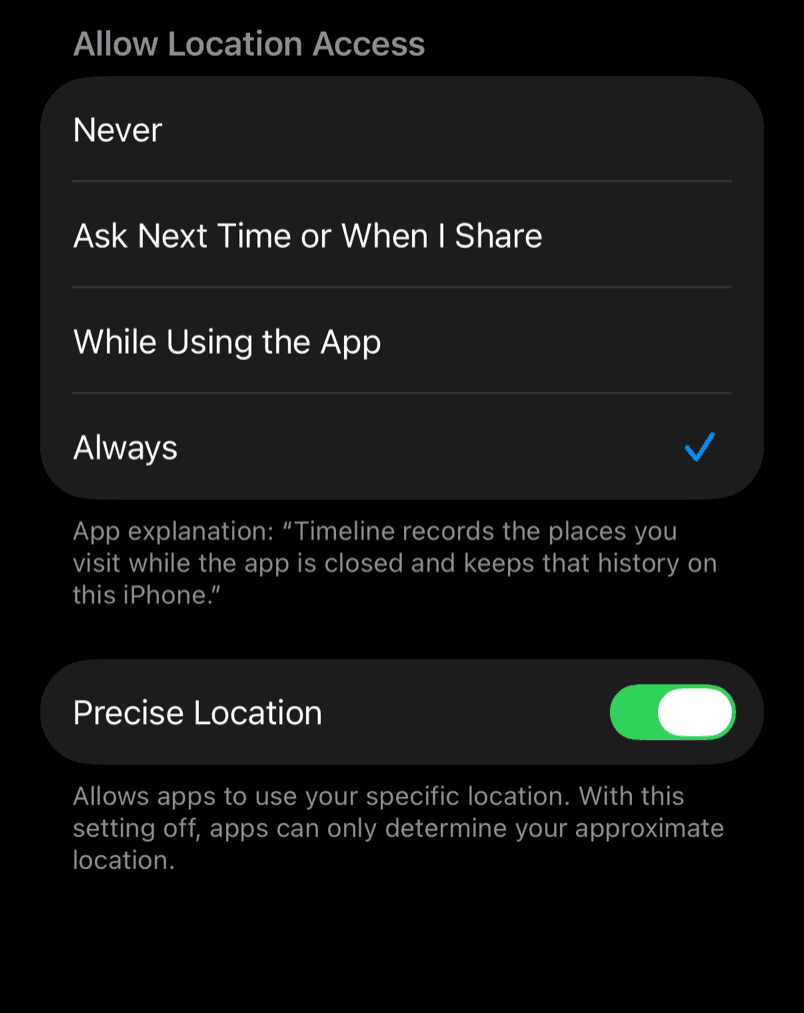
With While Using the App, Maps only gets your location while it's on screen, which leaves gaps all day. Low Power Mode can cause gaps too, so turn it off if they line up with a low battery.
Fix gaps on Android
First check that location is on in your phone's settings. Without it, Timeline saves nothing.
Then turn on Improve Location Accuracy under SettingsLocationLocation servicesLocation Accuracy. Without it the phone relies on GPS alone, which struggles indoors and between tall buildings.
Battery savers cause gaps too. On Pixel phones, Battery Saver stops location while the screen is off, and other phone makers have similar modes.
Google Timeline not working: symptoms and fixes
| What you see | Likely cause | Fix |
|---|---|---|
| Nothing since a certain day | Timeline or location off, or Incognito on | Check the settings above |
| Gaps whenever the iPhone is locked | Maps can't use your location in the background | Set Google Maps to Always |
| Gaps when the battery is low | Battery Saver or Low Power Mode | Turn it off |
| The café next door instead of the right one | Rough location, or a busy street | Turn on Location Accuracy or Precise Location, then edit the day |
| Visits on one phone but not the other | Each phone keeps its own Timeline | Look on the phone you carried |
| Empty after a new phone or a reset | History is stored on the phone | Restore a backup |
| Months of older history gone | Auto-delete, or the move to your phone | See below. Deleted history can't come back |
Why older history disappeared
Auto-delete is the most common reason. If it's set to 3, 18 or 36 months, anything older is deleted for good. You'll find it under Location and privacy settings, then Auto-delete Timeline.
The other is the move to your phone. During 2024 and 2025 Google moved Timeline off its servers and onto people's phones, with a deadline for each account. History that wasn't moved in time could be lost, and the auto-delete setting you chose during the move decided how much came across.
A few visits are removed on purpose. Google automatically deletes visits to sensitive places such as clinics and shelters.
Can you get it back?
Only from a backup. To restore one:
- In Google Maps, tap your profile picture, then Your Timeline.
- Tap the cloud icon at the top right.
- Under Your backups, choose your old phone.
- Tap More, then Import.
Backups can lag a few days behind, so the last few days may be missing. Without a backup, deleted history is gone, and that includes a reset phone or a deleted Google Maps app.
Why every phone misses some short stops
To save battery, phones don't run GPS all the time, and GPS struggles indoors. A five-minute stop inside a building gives any app very little to go on. In busy streets, Timeline may also pick the place next door to where you were.
Keep your own record on iPhone
If you'd rather not depend on Google's settings, Timeline for iPhone records your visits automatically with Apple's visit detection and keeps them on your phone, with no account. When it has no record, it shows a gap instead of guessing. It's coming soon to the App Store, and it can't recover Google history. Google Timeline alternatives for iPhone compares other options.
Questions
Can Google restore my Timeline without a backup?
No. Deleted Timeline data can't be recovered. When a bug deleted some people's Timelines in March 2025, only those with backups got their history back.
Why is my Timeline empty on my new phone?
Timeline is stored on each phone, so a new phone starts empty. Restore your old phone's backup with the steps above. If you never turned on backup, the history is still on the old phone, as long as it hasn't been reset.
Why does my Timeline show a place I didn't visit?
Your phone's location was a little off, which happens in busy streets. Open Your Timeline, tap Edit, then Edit day, and pick the right place.
Can I see my Google Timeline on a computer?
Not in Google Maps. Google Timeline on a computer shows how to open your export in a viewer instead.
Sources
Checked against these pages on 18 October 2026. The iPhone Settings screenshots come from the iOS 27 simulator, and we haven't yet tried every Google Maps step on a phone.
- Manage your Google Maps Timeline, Android and iPhone, Google Maps Help
- Use Google Maps in Incognito mode, Google Maps Help
- Find and improve your location's accuracy, Google Maps Help
- How Google keeps your Timeline data private, Google Maps Help
- Use Battery Saver on a Pixel phone, Pixel Phone Help
- Turn Location Services on or off and Low Power Mode, Apple Support
- Google Maps Timeline data loss, 9to5Google, March 2025